Best Self-Hosted Airtable Alternatives in 2026
Discover the best self-hosted Airtable alternatives in 2026. Compare NocoDB, Teable, Baserow, Grist, and more: licensing, features, and Docker setup guides included.
 Dragos17 min read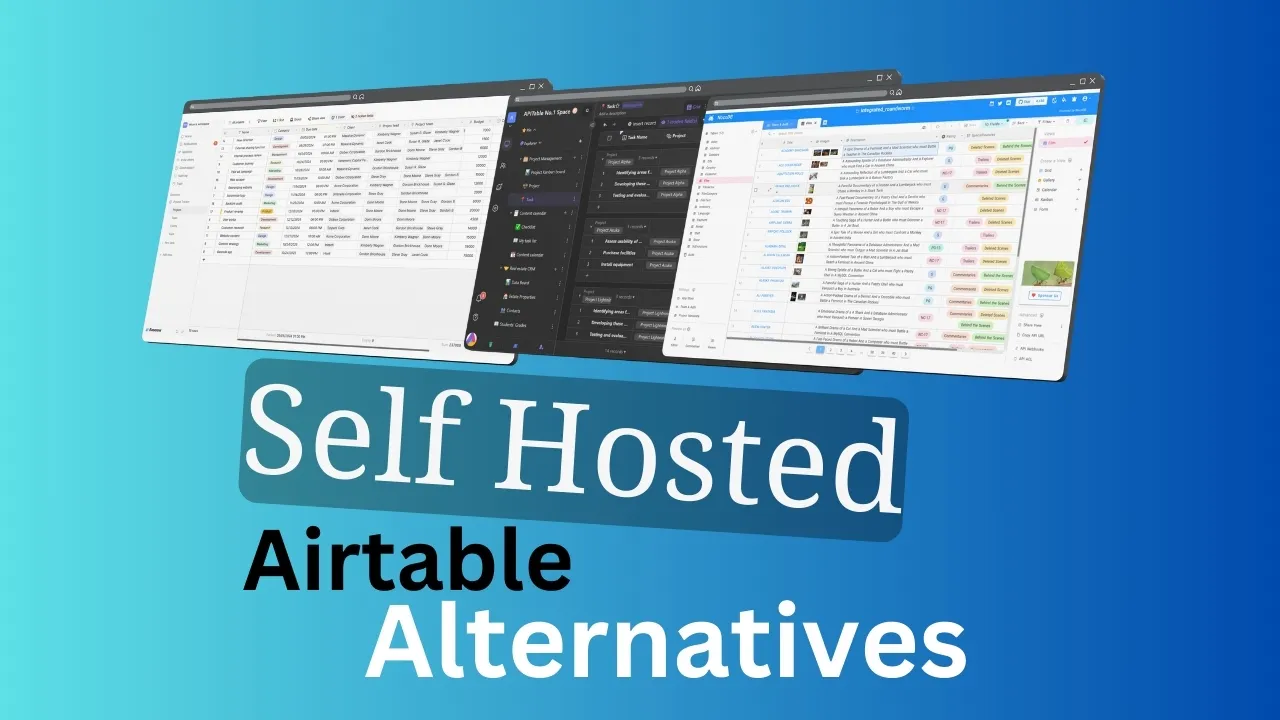
Airtable costs $20–45 per seat per month in 2026. For a 10-person team on the Business plan, that’s $5,400/year, and you still don’t own your data. If you’re evaluating self-hosted Airtable alternatives, this guide compares six tools you can deploy with Docker on a cheap VPS tonight: NocoDB, Teable, Baserow, Grist, undb, and Mathesar.
I’ll cover licensing reality (NocoDB is no longer open source), feature differences, Docker commands, and operator notes on database backends and backups. No feature tourism. Everything here runs on a single VPS with Docker Compose.
If you want more self-hosted apps for your stack, check best self-hosted apps for your business.
Overview of Airtable and its popularity
Airtable combines a spreadsheet interface with relational database power. Features like customizable views (Grid, Calendar, Kanban, Gallery), rich field types, automations, and integrations made it the default choice for non-technical teams who outgrew spreadsheets.
That popularity came with a pricing restructure in 2025–2026. The old Plus plan ($10/user/mo) was replaced by Team ($20/user/mo annual, $24 monthly). Business is now $45/user/mo annual. For a 50-person team, that’s $27,000/year.
Other reasons teams move to self-hosted alternatives:
- Data sovereignty: your data lives on Airtable’s servers
- Vendor lock-in: exporting linked records and automations is painful
- Row/record limits: Airtable caps records per base depending on your plan
- Privacy: sensitive data in a third-party SaaS raises compliance questions
Understanding self-hosted database solutions
Self-hosted in this context means running these tools as Docker containers on infrastructure you control: a VPS, a mini PC, or a NAS. All six tools in this article deploy with a single docker run or docker-compose up.
Benefits of self-hosting:
- Data control: you own the data, the backups, and the access policies
- Customization: deeper configuration than any SaaS allows
- Cost control: flat monthly VPS cost regardless of team size
- Privacy: data never leaves your infrastructure
- Performance: tune hardware and network for your workload
The tradeoff is you handle server management, security updates, and backup planning. If you’re already running Docker containers, this is familiar territory.
Where you can host Airtable alternatives
VPS server with Hetzner, DigitalOcean, etc.
A VPS is the fastest path to a running instance. Providers like Hetzner, Hostinger, DigitalOcean, and Vultr offer scalable resources starting at a few euros per month.
Recommended VPS Specs
A 2 vCPU / 4 GB RAM VPS (e.g. Hetzner CX22) is enough for most teams under 10 users. Plan 4 GB+ if running NocoDB or Teable with PostgreSQL.
If you want a web UI to manage your Docker deployments, look at Dokploy for one-click Docker deploys or a self-hosted PaaS like Coolify. For managing multiple servers, check the self-hosted server panels comparison.
To monitor CPU, memory, and disk on your VPS: How to monitor server and Docker resources
Home server
For complete hardware control with a one-time cost, a home server works well for personal or small-team use.
Mini PC
Mini PCs are compact, energy-efficient, and powerful enough for all the tools in this article. Expect to pay €200–400 for a capable unit. An ASUS DC510 mini PC or similar Intel NUC-style device handles Docker workloads fine.
For buying guidance, see best mini PCs for home servers and Docker containers for home servers.
NAS (Network Attached Storage)
NAS devices from Synology, QNAP, and Asustor can run Docker containers. Good for storage-heavy workloads but limited CPU. Fine for personal use, marginal for teams with concurrent access.
Quick comparison: all tools at a glance
| Application | License | GitHub Stars | Complexity | Backend | Key Benefit | OSS? |
|---|---|---|---|---|---|---|
| NocoDB | Sustainable Use License | 64.4k | Medium | MySQL/PG/SQLite/MSSQL/MariaDB | Most Airtable-like UI, widest DB support | source-available |
| Teable | AGPL-3.0 (CE) | 21.6k | Medium | PostgreSQL | Closest Airtable clone, million-row | CE: yes |
| Baserow | MIT (core) | 5.5k | Medium | PostgreSQL | Best UX, AI assistant, Automations | core: yes |
| Grist | Apache 2.0 | 11.4k | Low-Med | SQLite | Python formulas, spreadsheet-native | yes |
| undb | AGPL-3.0 | 3.0k | Low | SQLite/PostgreSQL | Lightweight, private-first | yes |
| Mathesar | GPL-3.0 | 5.1k | Medium | PostgreSQL | Works on existing PG schemas | yes |
Top self-hosted Airtable alternatives
If you are interested in more free self-hosted apps, check toolhunt.net self hosted section.
NocoDB: most feature-rich (source-available)
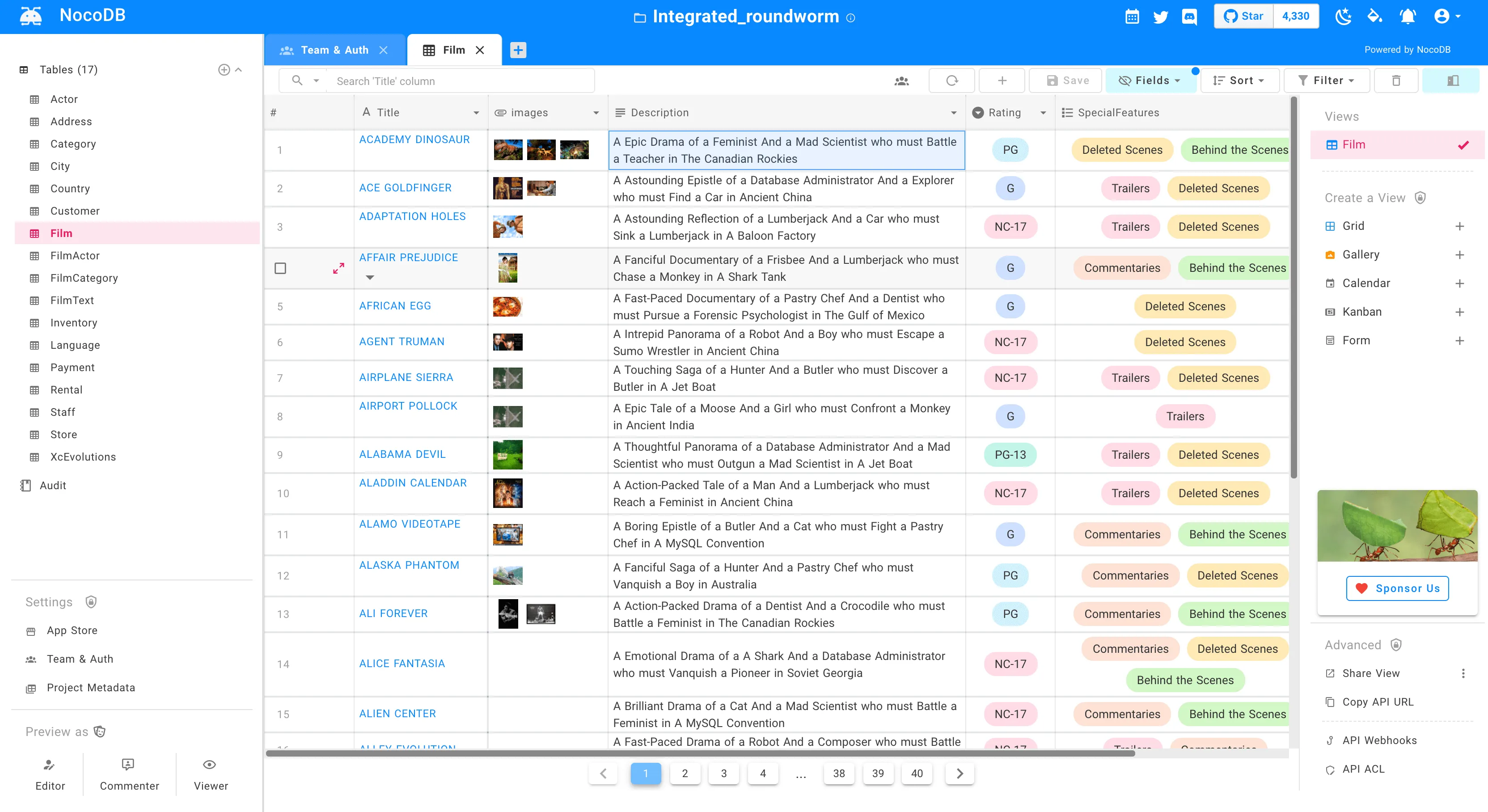
NocoDB transforms any MySQL, PostgreSQL, SQLite, Microsoft SQL Server, or MariaDB into a spreadsheet-like interface. It has 64.4k GitHub stars and the most Airtable-like UI of any tool in this list.
NocoDB License Change
NocoDB changed from AGPL-3.0 to a Sustainable Use License (Fair Code) in early 2026. It is no longer open source. You can still self-host for free, but offering NocoDB as a paid service or redistributing it commercially requires a separate license. Many advanced features are now gated behind paid tiers.
Community Edition features (free):
- Grid, Gallery, Kanban, Form views
- REST and GraphQL APIs
- Webhooks
- Role-based access control
- Canvas Grid (spreadsheet-like)
Enterprise-only features (paid):
- Realtime Collaboration
- Dashboard Widgets (Bar, Line, iFrame, Markdown)
- Gantt View, Timeline View
- Calendar Sync (Google/Outlook/CalDAV)
- Interfaces (app builder)
- NocoDB Sync, Custom Sync
- White-Label, Oracle/SQL Server support
Deploy with Docker:
docker run -d --name nocodb \
  -p 8080:8080 \
  -e NC_DB="pg://host:5432?u=user&p=password&d=nocodb" \
  -e NC_AUTH_JWT_SECRET="your-secret" \
  nocodb/nocodb:latest
SQLite works for quick evaluation, but PostgreSQL is recommended for production. Set NC_SITE_URL for shared links and OAuth to work. NocoDB 2026.05.2+ enforces SSRF protection by default. If connecting to local/private databases, set NC_ALLOW_LOCAL_EXTERNAL_DBS=true.
Verify: curl http://localhost:8080 should return the NocoDB login page.
For more details, visit the NocoDB GitHub repository.
Teable: closest Airtable clone (open source)
Why Teable?
Teable has more GitHub stars (21.6k) than Baserow and Grist combined. It’s the closest visual clone to Airtable among genuinely open-source options, filling the gap left by NocoDB’s license change.
Teable is PostgreSQL-native (Next.js + NestJS) and looks almost identical to Airtable. If your team evaluated NocoDB but licensing is a dealbreaker, Teable is worth a look.
Key features:
- Grid, Form, Kanban, Gallery, Calendar views
- Real-time collaboration
- Million-row scalability (Postgres-backed)
- AI fields and formula generation
- SQL query mode for developers
- Chart visualization
- Comments, history, undo/redo
- Plugin system
Enterprise features (advanced AI, automation, authority matrix) require a paid license, but the Community Edition covers core Airtable functionality: views, collaboration, fields, and APIs.
Deploy with Docker:
git clone https://github.com/teableio/teable.git
cd teable/dockers/examples/standalone/
docker compose up -d
Verify: curl http://localhost:8080 should return the Teable login/registration page.
Failure mode: Teable requires PostgreSQL. The compose file handles this, but if you bring your own Postgres, ensure the TEABLE_PG_DATABASE_URL env var is set correctly. The container will crash-loop without it.
Baserow: best UX with AI assistant
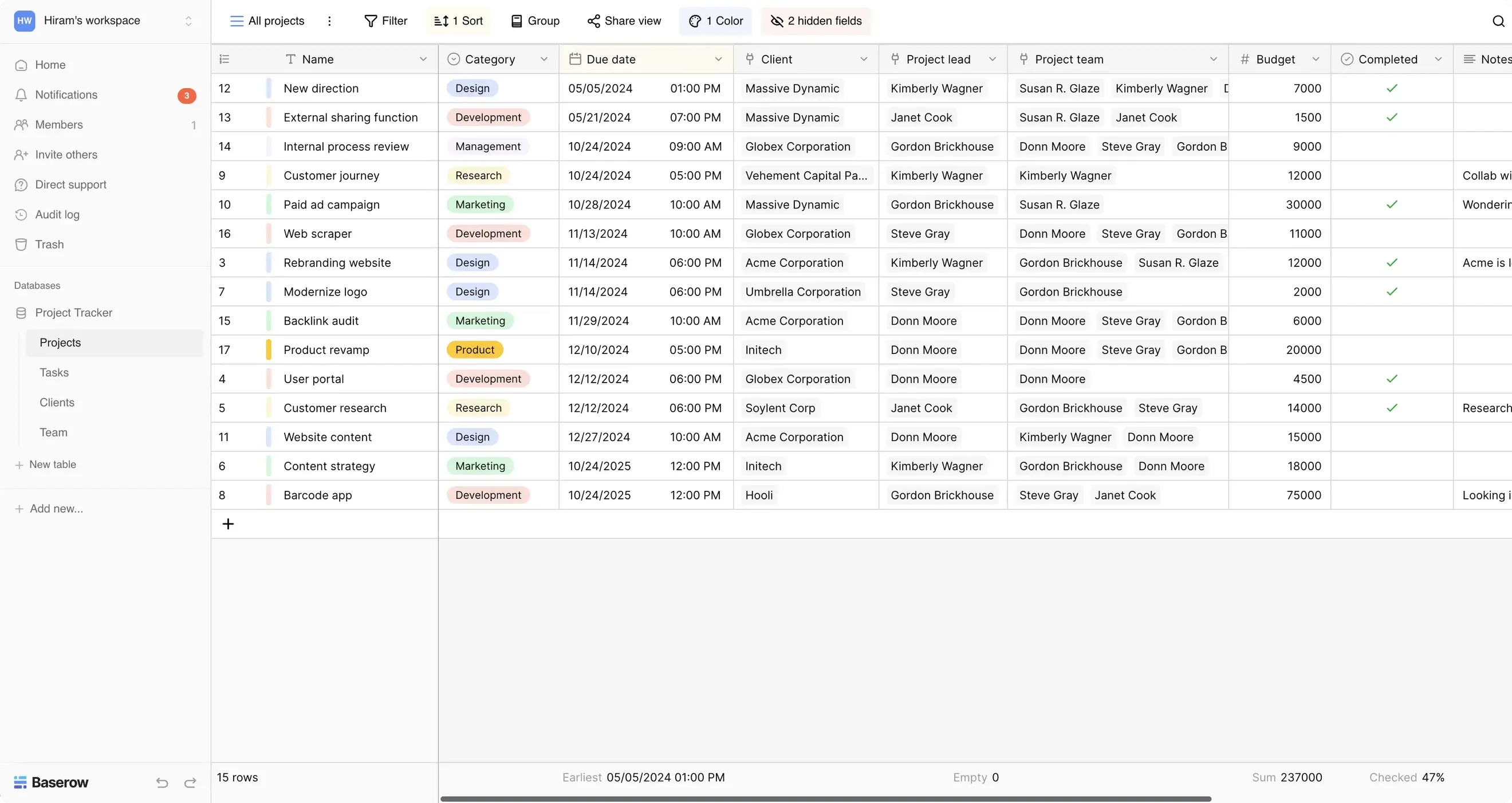
Baserow has an MIT-licensed core (5.5k GitHub stars) and focuses on the best non-technical user experience. It migrated from GitLab to GitHub in late 2025.
Baserow 2.0 (late 2025) added a lot:
- Kuma AI Assistant: build tables, write formulas, configure automations via natural language. Self-hosted users can bring their own model/API key.
- Automations Builder (beta): triggers, actions, router nodes, conditions, formulas, variables. AI steps inside automations.
- AI field upgrades: bulk-generate columns, auto-refresh values, multiple AI model support
- Timeline view with date dependencies (Gantt-style)
- Two-factor authentication (2FA)
- Workspace-wide search
- Two-way PostgreSQL sync
- Dashboards with summaries, bar charts, pie/doughnut charts
- Application Builder improvements: theme templates, custom CSS/JS, Send Email and HTTP Request actions
The unlicensed self-hosted version has unlimited rows, storage, and API requests, but lacks Kanban, Calendar, and Survey views. Premium features require a license.
Automations
Baserow’s Automations Builder handles simple workflows (triggers, conditions, actions). For complex multi-step automations across multiple services, pair it with a dedicated automation platform. See how to self-host n8n for advanced automations.
Deploy with Docker:
docker run -d --name baserow \
  -p 80:80 \
  -v baserow_data:/baserow/data \
  -e BASEROW_PUBLIC_URL=https://baserow.example.com \
  baserow/baserow:latest
Set BASEROW_PUBLIC_URL. Without it, features like file uploads and shared links break.
Verify: curl http://localhost:80 should return the Baserow login page.
Failure mode: If you see CSRF errors on login, BASEROW_PUBLIC_URL is missing or mismatched. For the full setup guide, visit the Baserow documentation.
Grist: spreadsheet-native with Python scripting
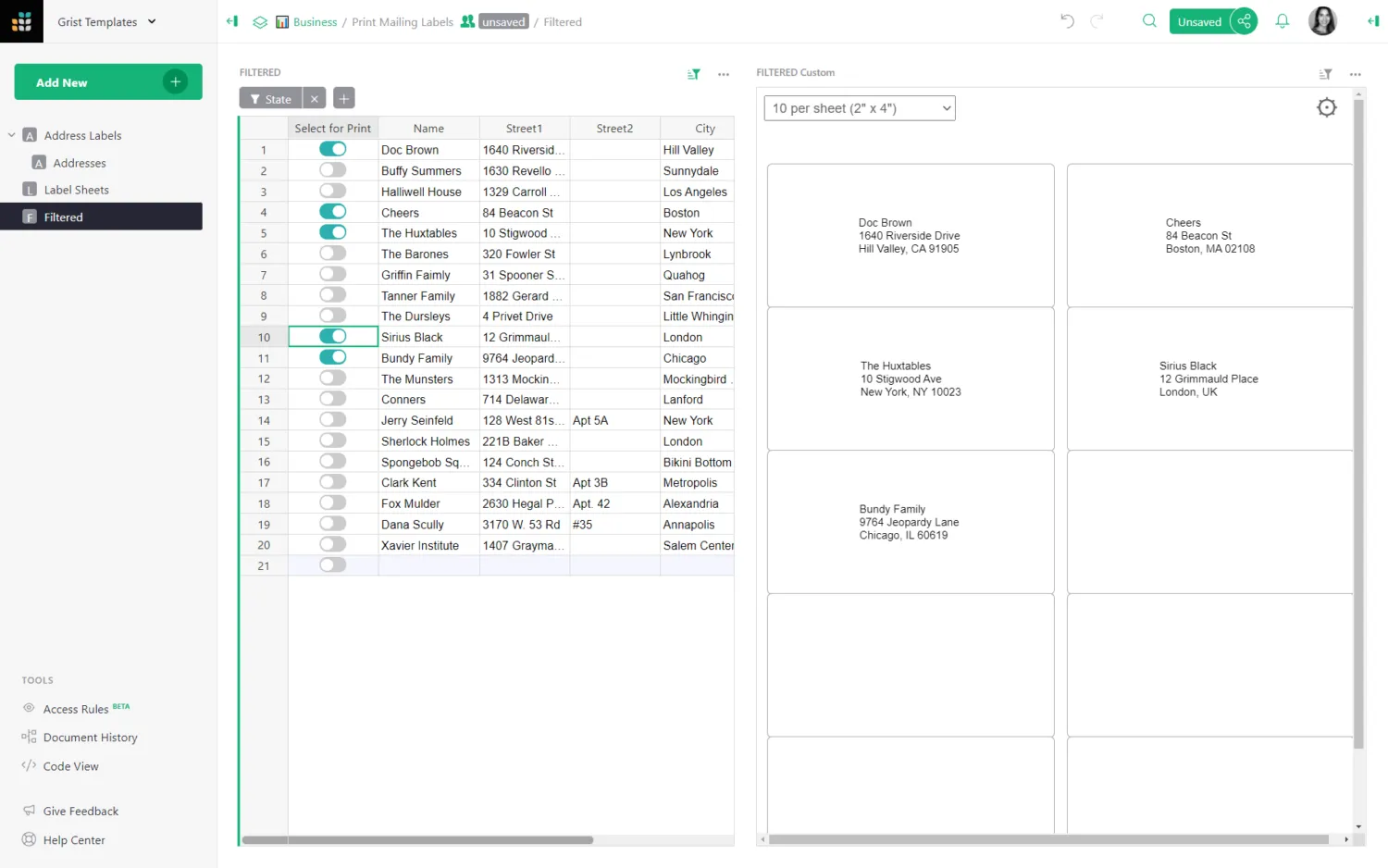
Grist is Apache 2.0 licensed (11.2k stars), truly open source. It’s a spreadsheet-database hybrid where formulas are written in Python, not a proprietary formula language. If your team thinks in pandas and NumPy, Grist is the obvious pick.
Recent additions:
- AI Formula Assistant: supports OpenRouter (Claude, DeepSeek, Mistral, etc.), not just OpenAI
- Grist Assistant (full edition): AI help with building tables, dashboards, styling, access rules
grist-ossDocker image: pure Apache 2.0, no proprietary code at allgrist-desktop: native desktop app for Linux/macOS/Windowsgrist-static: fully in-browser build for static websites- SCIM support for user/group provisioning
- Service accounts for fine-grained API access
Grist Editions
Grist offers two Docker images: gristlabs/grist (default, includes inert proprietary code) and gristlabs/grist-oss (pure Apache 2.0). For maximum open-source purity, use grist-oss.
Deploy with Docker:
docker run -d --name grist \
  -p 8484:8484 \
  -v grist-data:/persist \
  gristlabs/grist
Verify: curl http://localhost:8484 should return the Grist welcome page.
Production note: For production, set GRIST_SANDBOX_FLAVOR=gvisor (Linux) to sandbox Python formula execution. Without this, formulas run in the host environment. Fine for evaluation, not for production.
Pricing: Free self-hosted full edition for individuals and orgs with less than US $1M in total annual funding.
For detailed setup, visit the Grist documentation.
undb: lightweight and private-first
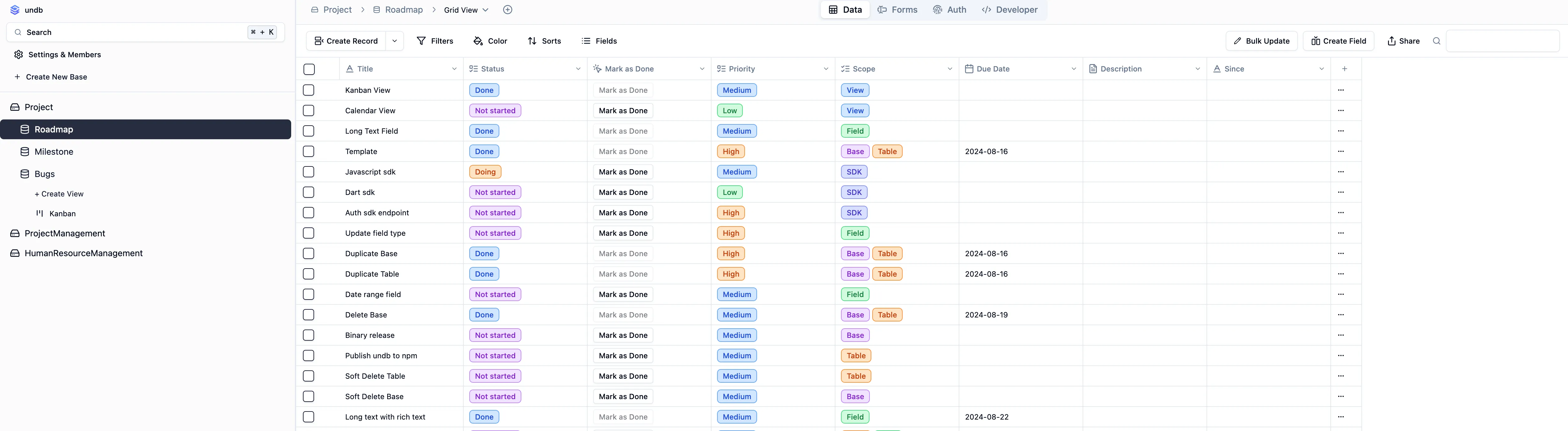
undb is AGPL-3.0 (3.0k stars) and focuses on being lightweight. It supports both SQLite and PostgreSQL backends, has a clean minimalist interface with Table and Kanban views, and runs on minimal resources.
Development Activity
undb’s last GitHub push was July 2025. The project is still functional, but consider this when evaluating long-term support and maintenance.
Deploy with Docker:
docker run -d -p 3721:3721 ghcr.io/undb-io/undbVerify: curl http://localhost:3721 should return the undb interface.
undb is a good choice for personal use, small teams, or situations where you want a simple database UI without the overhead of PostgreSQL. For teams evaluating long-term viability, Teable or Grist have stronger community momentum.
Mathesar: honorable mention (Postgres-native)
Mathesar is GPL-3.0 (5.1k stars), built with Python/Django + Svelte, and takes a different approach: it works directly on your existing PostgreSQL schemas. No abstraction layer, no migration needed. It respects your existing Postgres tables and access controls.
Key differentiators:
- Works directly on your Postgres database, no migration needed
- Respects existing Postgres access control
- 100% open source, no premium features, no paywalls
- Good for teams that already have Postgres and want a UI on top
Limitations: Postgres-only, smaller community, less polished UI than NocoDB or Teable.
Deploy with Docker:
docker run -d --name mathesar \
  -p 8000:8000 \
  -e DJANGO_DATABASE_URL=postgres://user:password@host:5432/dbname \
  mathesar/mathesar-prod:latest
Verify: curl http://localhost:8000 should return the Mathesar interface.
Mathesar is best positioned for teams already running PostgreSQL who want a spreadsheet-like UI without touching their existing schema.
Licensing and open source status comparison
This is the most important section in this 2026 update. Licensing has changed a lot, especially for NocoDB.
“Open source” has a specific meaning: an OSI-approved license (Apache 2.0, MIT, GPL, AGPL). “Source-available” or “Fair Code” licenses allow viewing and self-hosting but restrict commercial redistribution.
| Tool | License | Fully Open Source? | Free Self-Host? | Paid Tiers |
|---|---|---|---|---|
| NocoDB | Sustainable Use License | no | yes | Enterprise features gated |
| Teable | AGPL-3.0 (CE) | CE: yes | yes | Enterprise features |
| Baserow | MIT (core) | core: yes | yes | Premium/Advanced/Enterprise |
| Grist | Apache 2.0 | yes | yes | Free for <$1M orgs |
| undb | AGPL-3.0 | yes | yes | None currently |
| Mathesar | GPL-3.0 | yes | yes | None |
What Does 'Open Source' Mean?
OSI-approved licenses (Apache 2.0, MIT, GPL, AGPL) meet the Open Source Definition. “Source-available” or “Fair Code” licenses like NocoDB’s allow viewing and self-hosting but restrict commercial redistribution. If true open-source licensing matters to your team, Grist, undb, and Mathesar are the safest choices.
Why this matters for self-hosters: If you plan to offer the tool as a service, redistribute it, or embed it in a product, licensing is critical. NocoDB’s Sustainable Use License prohibits commercial redistribution. Teable’s AGPL requires you to open-source modifications if you distribute. Grist’s Apache 2.0 and Baserow’s MIT core are the most permissive.
Airtable pricing vs self-hosted costs
The math here is straightforward.
Airtable 2026 pricing:
- Team: $20/user/mo (annual) or $24 (monthly)
- Business: $45/user/mo (annual) or $54 (monthly)
- 10-person team on Business = $5,400/year
- 50-person team on Business = $27,000/year
Self-hosted cost:
- Hetzner CX22 (2 vCPU, 4 GB RAM): €4.49/month (€54/year)
- Hostinger VPS: starting ~€5/month
- DigitalOcean Basic Droplet: $6/month
- Vultr Cloud Compute: $6/month
Cost Savings
A 10-person team on Airtable Business pays $5,400/year. A Hetzner CX22 VPS costs €54/year. Self-hosting any of these tools on that VPS gives you comparable functionality at ~1% of the cost.
The caveat: self-hosting cost doesn’t include your time for maintenance, updates, and backups. But if you’re already running Docker containers, the marginal effort is small.
Operator notes: database backends, backups, and resource planning
Database backend comparison
The database backend determines resource requirements, backup strategy, and scalability ceiling:
- PostgreSQL-only: Teable, Baserow, Mathesar: more robust for concurrent access, requires more RAM
- Multi-DB: NocoDB: supports MySQL, PostgreSQL, SQLite, MSSQL, MariaDB. PostgreSQL recommended for production
- SQLite-based: Grist (SQLite by default), undb (SQLite or PostgreSQL option): simpler setup, single-writer limitation
PostgreSQL handles concurrent users and large datasets better. SQLite is simpler to back up and runs on fewer resources. For teams under 10 users with <100k rows, either works fine.
Backup strategies
For SQLite-based tools (Grist, undb with SQLite):
# Stop the container, copy the data volume, restart
docker stop grist
cp -r /var/lib/docker/volumes/grist-data/_data /backup/grist-$(date +%F)
docker start grist
For PostgreSQL-based tools (Teable, Baserow, Mathesar, NocoDB with PG):
docker exec postgres_container pg_dump -U user dbname > backup-$(date +%F).sqlTest Your Backups
A backup you haven’t tested is not a backup. After your first backup, restore it to a fresh container and verify the data is intact.
Schedule daily backups. Store them off-site (S3-compatible storage). Test restores quarterly at minimum.
Resource planning
Minimum VPS specs per tool for a small team (<10 users, <100k rows):
| Tool | Minimum RAM | Recommended |
|---|---|---|
| NocoDB (with PG) | 4 GB | 4 GB |
| Teable | 4 GB | 4 GB |
| Baserow | 4 GB | 4 GB |
| Grist | 2 GB | 4 GB |
| undb | 2 GB | 2 GB |
| Mathesar | 4 GB | 4 GB |
Monitor CPU and memory once deployed. How to monitor server and Docker resources.
Factors to consider when choosing an alternative
When choosing a tool, think about what matters most for your setup:
-
Ease of use and UI polish: Teable and Baserow have the most polished interfaces. NocoDB is close. Grist has a learning curve if you’re not comfortable with Python formulas.
-
Scalability and performance: PostgreSQL-backed tools (Teable, Baserow, Mathesar) handle concurrent access and large datasets better. SQLite tools (Grist, undb) are simpler but single-writer.
-
Integration capabilities: All tools offer REST APIs. NocoDB also has GraphQL. None match Airtable’s automation depth natively. For complex workflows, pair your database tool with self-hosted n8n for advanced automations.
-
Community support and development activity: NocoDB (64.4k stars) and Teable (21.6k) have the most active communities. Check GitHub issue activity and release cadence before committing.
-
Licensing and long-term viability: NocoDB’s license change is a warning: projects can change terms. True OSI-approved licenses (Grist, undb, Mathesar) offer more predictability.
Which tool should I pick?
Need widest DB support and most features? → NocoDB (but accept the Fair Code license)
Need closest Airtable clone with OSS license? → Teable
Need best non-technical UX + AI assistant? → Baserow
Need spreadsheet-native with Python formulas? → Grist
Need lightweight / personal use? → undb
Need Postgres-native on existing DB? → Mathesar
Security considerations for self-hosted containers
When deploying these containers in production:
- Reverse proxy with SSL: don’t expose raw HTTP ports. Use Traefik or Nginx Proxy Manager to front these services with HTTPS and automatic certificate renewal.
- Regular container updates: watch for security releases. Set up Watchtower or similar for automated updates, or at minimum check monthly.
- Network segregation: run database containers on an internal Docker network, not exposed to the host.
- Access control and MFA: enable 2FA where available (Baserow supports it). Use strong JWT secrets.
- Monitoring and logging: set up basic monitoring. Secure your VPS with CrowdSec for intrusion detection.
- DNS-level protection: use NextDNS for DNS-level privacy and ad/malware blocking on your server.
- SSRF protection: NocoDB 2026.05.2+ enforces SSRF protection by default. If you need to connect to local/private databases, set
NC_ALLOW_LOCAL_EXTERNAL_DBS=true.
Conclusion
The self-hosted Airtable space changed a lot since 2025. NocoDB is still the most feature-rich option but is no longer open source. Teable emerged as the closest Airtable clone with a genuine AGPL license. Baserow 2.0 added AI and automations. Grist remains the best choice for teams that think in Python. undb is the lightweight option. Mathesar fills a niche for Postgres-native teams.
The cost math is clear: self-hosting on a €5/month VPS gives you 90% of Airtable’s functionality at 1% of the price. The tradeoff is you own the operations: backups, updates, security. If you’re already running Docker, that’s a trade worth making.
Start with Docker on a cheap VPS. Evaluate one or two tools with real data before committing. The migration path from Airtable is CSV export → import, with some manual cleanup of linked records.
Get Started with Hetzner VPSFAQ
Is NocoDB still free to self-host?
Yes. NocoDB’s Community Edition is free to self-host with no row limits. However, the license changed from AGPL-3.0 to a Sustainable Use License (Fair Code) in early 2026, meaning you cannot offer it as a commercial managed service. Many advanced features (Gantt, Timeline, Realtime Collaboration, Dashboard Widgets) now require a paid Enterprise license.
What is the best open-source Airtable alternative?
If “open source” means OSI-approved license: Grist (Apache 2.0) is the most mature truly open-source option. Teable (AGPL-3.0 Community Edition) is the closest Airtable UI clone. undb and Mathesar are also fully open source. NocoDB is source-available (Fair Code), not open source.
Can I migrate from Airtable to a self-hosted alternative?
NocoDB has a built-in Airtable CSV/JSON import. Baserow supports CSV import. Teable supports CSV and Airtable base import. For all tools, export your Airtable data as CSV and import it. Expect some manual cleanup of linked records and formulas.
Which tool needs the least resources?
Grist and undb are the lightest. Both run comfortably on 2 vCPU / 2 GB RAM with SQLite. NocoDB with SQLite also runs on minimal resources. PostgreSQL-based tools (Teable, Baserow, Mathesar) need at least 4 GB RAM.
Do any of these match Airtable's automations?
No single tool matches Airtable’s automation depth. Baserow 2.0’s Automations Builder (triggers, actions, conditions) is the closest self-hosted option. For complex workflows, pair your database tool with a self-hosted automation platform like n8n. See our n8n self-hosting guide.