How to Install Memos with Docker Compose: EASY STEPS!
Step-by-step guide to install Memos with Docker Compose using SQLite or PostgreSQL. Self-host a privacy-first note-taking app with Traefik reverse proxy in minutes.
 Dragos14 min read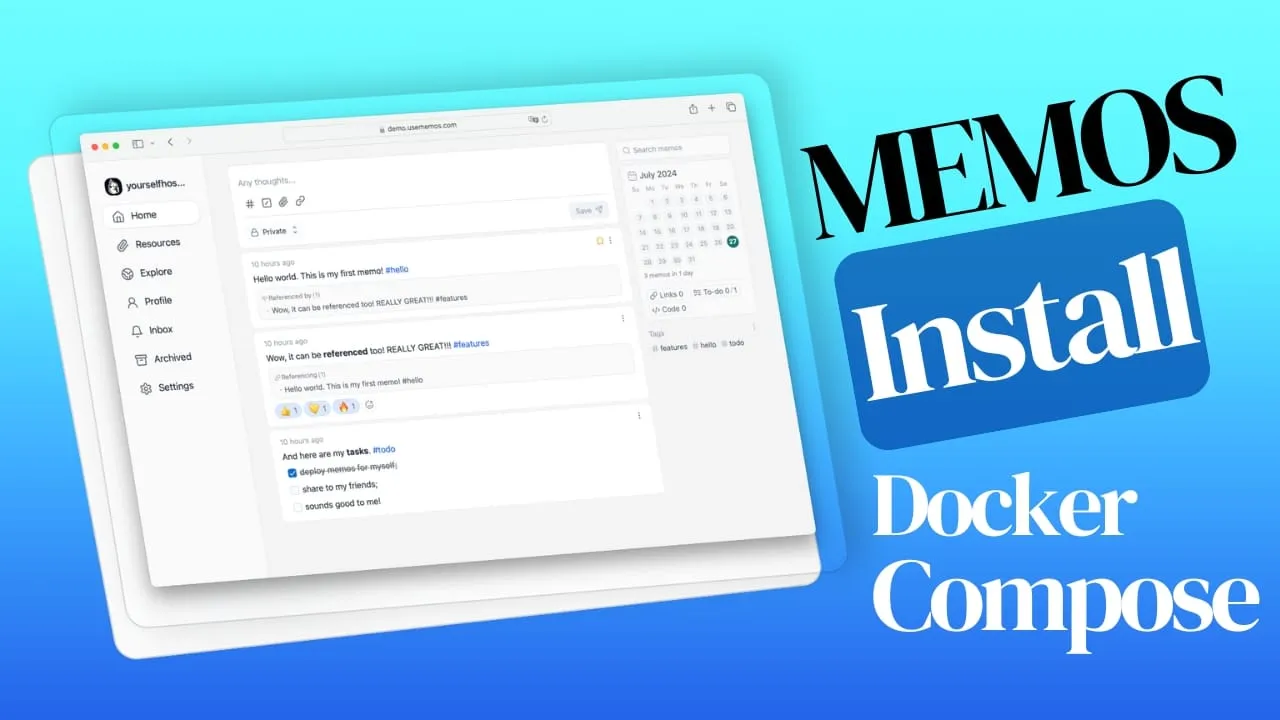
Memos is a self-hosted note-taking app for personal knowledge management. It’s open source (MIT license), runs on Go + React, and has over 60,000 GitHub stars as of v0.30.0 (July 2025). It uses SQLite by default, supports Markdown out of the box, and runs comfortably on 1 CPU / 1 GB RAM. This guide walks through installing Memos with Docker Compose using either SQLite or PostgreSQL, behind a Traefik reverse proxy with automatic TLS.
What is Memos?
Memos is a privacy-first, self-hosted note-taking application. All data stays on your server. There’s no cloud dependency, no subscription, no tracking. The interface is clean: you type Markdown, it renders live, and everything syncs across your devices through the web UI.
Core features:
- Markdown support with a new CodeMirror 6 editor and formatting toolbar (v0.30.0)
- Lightweight architecture: the Go backend and React frontend keep memory usage low
- Customizable UI: light/dark themes, server name, icon, description
- Multi-device access through any browser
- Attachments stored on filesystem by default since v0.27.0 (not inside the database)
- Open source under MIT license. Contribute or fork as you like.
If you need something heavier for team documentation, check How to Install Outline Wiki on Docker or Docmost Docker Compose Install.
Since the original publish, Memos has added several features worth knowing about:
- Web Clipper browser extension for Chrome and Firefox
- Voice notes with AI transcription via OpenAI or Gemini providers
- MCP server at
/mcpfor AI client integration (Model Context Protocol) - CodeMirror 6 editor with WYSIWYG-style formatting toolbar
- Multi-column feed layouts: 1, 2, or 3 columns plus auto-fit
- SSE live refresh: real-time updates without polling
- Standard Webhooks with HMAC-SHA256 signing
- Deployment-managed configuration via
/etc/secretsJSON files for GitOps workflows
Install Memos with Docker Compose
Below are two complete setups: SQLite (simplest, recommended for personal use) and PostgreSQL (for when you already run Postgres or want pg_dump backups).
Monitor your server
After deploying Memos, set up server monitoring to keep an eye on CPU, memory, and disk. See How To Monitor Server and Docker Resources or set up Beszel & Uptime Kuma for a lightweight dashboard.
Prerequisites
- A VPS or home server. Memos runs on 1 CPU / 1 GB RAM without issues. A Hetzner CX22, Hostinger KVM VPS, or Vultr instance all work fine. You can also use a Mini PC as a Home Server.
- Docker and Docker Compose installed
- A reverse proxy with TLS. Traefik is recommended. See How to Use Traefik as A Reverse Proxy in Docker and Traefik FREE Let’s Encrypt Wildcard Certificate. You can also use Nginx, Caddy, or Cloudflare Tunnel.
- A domain name pointed to your server
You can manage Docker Compose stacks through Dockge or any of the Best Self-Hosted Server Panels.
Quick start: Memos with SQLite
SQLite is the default backend and the simplest way to get running. One container, one volume, no database service to manage.
services:
  memos:
    image: neosmemo/memos:stable
    container_name: memos
    restart: unless-stopped
    networks:
      - traefik-net
    volumes:
      - ./memos:/var/opt/memos
    environment:
      MEMOS_DRIVER: sqlite
      MEMOS_PORT: 5230
      # Set this to your public URL to enable public mode.
      # Leave empty for private-only (no anonymous access, no RSS, no Explore).
      MEMOS_INSTANCE_URL: https://memos.yourdomain.com
      # MEMOS_LOG_LEVEL: debug  # Uncomment for troubleshooting
    labels:
      - traefik.enable=true
      - traefik.http.routers.memos.rule=Host(`memos.yourdomain.com`)
      - traefik.http.routers.memos.entrypoints=websecure
      - traefik.http.routers.memos.tls.certresolver=letsencrypt
      - traefik.http.services.memos.loadbalancer.server.port=5230

networks:
  traefik-net:
    external: true
v0.30.0 breaking change: private mode default
Since Memos v0.30.0, leaving MEMOS_INSTANCE_URL empty puts the instance in private-only mode. Anonymous visitors get redirected to sign-in, RSS is disabled, and Explore is hidden. Set MEMOS_INSTANCE_URL to your public URL (e.g., https://memos.yourdomain.com) if you want public memos and RSS feeds.
What this does:
neosmemo/memos:stablepulls the latest stable release (currently v0.30.0)- The volume
./memos:/var/opt/memospersists all data (database + attachments) on the host - Traefik labels route
memos.yourdomain.comto port 5230 with automatic TLS via your cert resolver - The container runs as non-root by default (UID 10001), no need for
user: root
If you’re not using Traefik (e.g., Cloudflare Tunnel or direct access), replace the labels block with a port mapping:
ports:
  - 5230:5230
Remove the networks section if you’re not using an external Traefik network.
Memos with PostgreSQL
Use PostgreSQL if you already run it for other services, want pg_dump backup support, or prefer a managed database backend. MySQL is also supported. See the Memos database docs for connection strings.
- Zero configuration, just a file on disk
- Ideal for personal, single-node use
- Backup = copy the data directory
- Runs anywhere, no database service to maintain
- Default and recommended for most users
- You already run PostgreSQL for other services
- You want
pg_dumpfor structured backups - You prefer operational control (replication, monitoring)
- You need better concurrency handling for many attachments
- See Multiple PostgreSQL Databases in ONE Service to share a single Postgres container
services:
  memos:
    image: neosmemo/memos:stable
    container_name: memos
    restart: unless-stopped
    networks:
      - traefik-net
    depends_on:
      memos-db:
        condition: service_healthy
    volumes:
      - ./memos:/var/opt/memos
    environment:
      MEMOS_DRIVER: postgres
      MEMOS_DSN: postgresql://${POSTGRES_USER}:${POSTGRES_PASSWORD}@memos-db:5432/${POSTGRES_DB}?sslmode=disable
      MEMOS_PORT: 5230
      MEMOS_INSTANCE_URL: https://memos.yourdomain.com
    labels:
      - traefik.enable=true
      - traefik.http.routers.memos.rule=Host(`memos.yourdomain.com`)
      - traefik.http.routers.memos.entrypoints=websecure
      - traefik.http.routers.memos.tls.certresolver=letsencrypt
      - traefik.http.services.memos.loadbalancer.server.port=5230

  memos-db:
    image: postgres:16-alpine
    restart: unless-stopped
    networks:
      - traefik-net
    healthcheck:
      test: ["CMD-SHELL", "pg_isready -U ${POSTGRES_USER} -d ${POSTGRES_DB}"]
      interval: 5s
      timeout: 5s
      retries: 5
    volumes:
      - ./memos-db:/var/lib/postgresql/data
    environment:
      POSTGRES_DB: ${POSTGRES_DB}
      POSTGRES_USER: ${POSTGRES_USER}
      POSTGRES_PASSWORD: ${POSTGRES_PASSWORD}

networks:
  traefik-net:
    external: true
The depends_on with condition: service_healthy ensures Memos doesn’t start until PostgreSQL is accepting connections. The PostgreSQL container uses postgres:16-alpine for a small image footprint.
Create the .env file
The SQLite setup doesn’t need an .env file. For PostgreSQL, create a .env file in the same directory as your docker-compose.yml:
POSTGRES_DB=memos
POSTGRES_USER=memos
POSTGRES_PASSWORD=change-me-to-a-strong-random-password
Change the default password
Generate a random password before deploying. You can use openssl rand -base64 32 to create one. Don’t run PostgreSQL with a guessable password, even on a private network.
Start Memos
docker compose up -dThis pulls the images, creates the containers, and starts everything in detached mode.
Verify it works
After docker compose up -d, confirm everything is healthy:
# Check container status — both should be "Up" and (for postgres) "healthy"
docker compose ps

# Check Memos logs for startup confirmation
docker compose logs memos
# Look for: "Server started at http://localhost:5230"

# Quick HTTP check
curl -I http://localhost:5230
# Expect: HTTP/1.1 200 OK
If the container is restarting, check the logs with docker compose logs memos --tail 50 for error messages.
Access the Memos UI
Open https://memos.yourdomain.com in your browser. The first user you create becomes the admin. You’ll see the main memo feed:

From the Settings page you can switch between light and dark themes, manage users, configure SSO/OAuth2 (callback URL: https://<instance>/auth/callback), and set up storage backends:

Environment variables reference
| Variable | Purpose | Default |
|---|---|---|
MEMOS_PORT |
HTTP listen port | 5230 |
MEMOS_DRIVER |
Database backend: sqlite, postgres, mysql |
sqlite |
MEMOS_DSN |
Database connection string | Auto for SQLite |
MEMOS_INSTANCE_URL |
Public URL; empty = private mode | (empty) |
MEMOS_UID / MEMOS_GID |
Override container UID/GID | 10001 / 10001 |
MEMOS_LOG_LEVEL |
debug, info, warn, error |
info |
See the full environment variables docs for all options.
Backup and upgrade Memos
Backup
Backups depend on your database backend. Don’t skip this, especially before upgrades.
SQLite:
# Stop Memos for a consistent snapshot
docker compose stop memos
tar -czf memos-backup-$(date +%Y%m%d).tar.gz ./memos/
docker compose start memos
PostgreSQL:
# No downtime needed — pg_dump is consistent
docker compose exec memos-db pg_dump -U memos memos > memos-dump-$(date +%Y%m%d).sql
Automate backups
Set up a cron job to run these commands daily. For offsite safety, push the backup files to S3-compatible storage (MinIO, Backblaze B2, Bunny Storage). A missed backup is worse than a failed upgrade. At least with a backup you can roll back.
Upgrade
Memos releases frequently. Always back up first and check the changelog for breaking changes.
# 1. Backup (see above)
# 2. Pull the new image
docker compose pull
# 3. Recreate containers
docker compose up -d
# 4. Verify
docker compose logs memos
# Look for: "Server started at http://localhost:5230"
Upgrading from pre-v0.30.0?
Memos v0.30.0 introduced private-mode-by-default. If your instance was publicly accessible before, set MEMOS_INSTANCE_URL to your public URL in the compose file before upgrading. Otherwise you’ll lose anonymous access, RSS, and Explore after the restart. See the changelog for v0.28.0 SSO identity re-linking requirements as well.
After upgrading, clean up old Docker images to free disk space. See How To Clean All Docker Images.
Troubleshooting
Permission denied on volume (UID/GID mismatch)
Memos v0.30.0 runs as UID 10001 by default. If you see permission errors in the logs, the host volume directory may be owned by a different user.
Fix options:
- Set environment variables to override:
MEMOS_UID=1000andMEMOS_GID=1000(match your host user) - Or fix ownership:
chown -R 10001:10001 ./memos/
See How to Add Users to a Docker Container for more on container user management.
Container won't start after upgrade
Check the logs for migration errors:
docker compose logs memos --tail 100Common causes:
- Database migration failed. Restore from your pre-upgrade backup and check the changelog for breaking changes.
MEMOS_INSTANCE_URLnot set after upgrading to v0.30.0 (shouldn’t prevent startup, but check)- PostgreSQL not ready. Ensure the healthcheck passes (
docker compose psshould show “healthy” formemos-db).
If you need to roll back: docker compose down, restore the backup, pin the image to a specific version tag (e.g., neosmemo/memos:0.29.0), and docker compose up -d.
Can't see public memos / RSS not working
Since v0.30.0, an empty MEMOS_INSTANCE_URL puts the instance in private mode. Anonymous visitors get redirected to sign-in, RSS feeds are unavailable, and Explore is hidden.
Fix: set MEMOS_INSTANCE_URL to your full public URL in the compose environment:
environment:
  MEMOS_INSTANCE_URL: https://memos.yourdomain.com
Then restart: docker compose up -d
Database connection refused (PostgreSQL)
Make sure the memos-db container is healthy before Memos starts. The depends_on: condition: service_healthy directive handles this, but check:
docker compose ps
# memos-db should show "healthy" in the STATUS column
docker compose logs memos-db
# Look for: "database system is ready to accept connections"
Also verify that your .env credentials match between the Memos MEMOS_DSN and the PostgreSQL POSTGRES_* variables.
Memos is slow or unresponsive
Memos is lightweight. It runs on a Raspberry Pi with 1 GB RAM. If it’s slow, the issue is almost certainly not Memos itself.
Check:
- Server resources:
docker stats memosfor CPU/memory usage - Disk space:
df -h. A full disk will cause write failures. - Container resource limits: if you set
mem_limitorcpusin compose, they may be too low - Attachment storage: if you have many large attachments on a slow disk, uploads will lag
See How To Monitor Server and Docker Resources for detailed monitoring setup.
Security and production hardening
Memos v0.30.0 runs as UID 10001 by default. Don’t override with user: root, there’s no reason to. Always put Memos behind a reverse proxy with TLS. Traefik + Let’s Encrypt is the recommended path. Never expose port 5230 directly to the internet.
Only expose ports 80 and 443. Block direct access to 5230 from outside. For public instances, consider adding Traefik rate-limit middleware to prevent abuse.
Memos releases frequently. Subscribe to GitHub releases and update monthly. Set up automated daily backups to S3-compatible storage. A local backup on the same disk is better than nothing, but it won’t save you from a disk failure.
Harden your server too
Memos is only as secure as the server it runs on. Secure your VPS with CrowdSec and add Traefik Basic Authentication as an extra layer for private instances. Set up Beszel & Uptime Kuma to get alerted if Memos goes down.
What’s new in Memos v0.27 to v0.30
If you installed Memos before August 2024, here’s what changed:
| Version | Key features |
|---|---|
| v0.27.0 | Voice notes, AI transcription (OpenAI/Gemini), MCP server at /mcp, SSE live refresh, @username mentions, filesystem attachment storage (new default) |
| v0.28.0 | SSO identity re-linking (breaking change: existing SSO users must re-link after upgrade) |
| v0.29.0 | Link preview cards, SMTP notification email settings, dedicated shortcuts page, configurable log level, instance statistics APIs |
| v0.30.0 | Web Clipper (Chrome + Firefox), CodeMirror 6 editor with toolbar, multi-column layouts, Standard Webhooks with HMAC signing, deployment-managed config via /etc/secrets JSON, private mode default |
The Web Clipper and MCP server are the standout additions. The clipper lets you save web pages directly to Memos from your browser. The MCP endpoint makes Memos accessible to AI clients that support the Model Context Protocol.
Conclusions
Setting up Memos with Docker Compose takes under 10 minutes. SQLite is the default for a reason: zero config, one volume, and you’re done. PostgreSQL adds operational controls if you need them. Either way, back up your data and check the changelog before upgrading.
If you are interested to see some free cool open source self hosted apps you can check toolhunt.net self hosted section.
For more self-hosted tools and Docker setups, check out the Best Self-Hosted Server Panels or explore the full list below.
Explore More Docker Containers